
With over 136 million active buyers worldwide, eBay remains one of the largest and most lucrative marketplaces for print-on-demand sellers. While basic print-on-demand dropshipping on eBay is common, selling personalised products has historically been a massive headache.
Until now, offering custom items on eBay meant manually messaging buyers, chasing down missing details, waiting days for photo attachments, manually creating artwork files in Photoshop, and sending proof images back and forth.
We set out to fix that entirely.
Papello is proud to launch our native eBay Integration, featuring a world-first innovation: Fully Automated eBay Personalisation. You can now sell custom print-on-demand products on eBay with zero-touch automation from customer purchase to final dispatch.
The Problem: Why Personalised POD on eBay Was Broken
Unlike platforms like Etsy, eBay strictly prohibits sending buyers links to external websites or third-party forms. Sellers who tried to automate personalisation were caught between two bad options: manually handling every buyer message or risking account penalties by violating eBay's link policies.
Because of this friction, most POD sellers completely avoided personalised items on eBay. That left a massive, untapped market with high buyer demand and very low seller competition.
The Solution: Native In-App Messaging Automation
We built a solution that operates 100% inside the native eBay messaging app. No external links. No policy breaches. No manual intervention required.
Here is how the automated workflow operates when an eBay buyer purchases your personalised Papello product:
Instant Question Dispatch: As soon as an order is placed, Papello automatically sends an eBay message to the buyer with the exact personalisation questions mapped from your Papello design template.
Step-by-Step Response Collection: The buyer responds directly inside their eBay chat. Papello processes text responses (e.g. custom names or card messages), image options (e.g. selecting design variations), and uploaded photo attachments (JPG or PNG files).
Automated Print Render & Proof Generation: Once all questions are answered, Papello automatically compiles the inputs and renders a high-resolution print file along with a visual preview mockup.
Buyer Proof Approval: Papello sends the visual preview directly back to the buyer in eBay Messages asking them to approve the design.
Production Routing: Once the buyer replies to confirm, the print-ready file is approved and sent straight into production on Papello's 11-colour Giclée printers.
How it works: See it in action
The eBay listing the video below was created on Papello and published to eBay.
The listing was attached to a template created in the Papello Design Studio with three custom fields
Image Selector: Buyer selects between multiple images ( in our example a dog or a rabbit on the back of the card)
Image Upload: Buyer uploads an image to be placed within the placeholder
Text Input: Buyer enters a custom name to be added to the front of the card
This is how the template looks in the Papello Design Template:
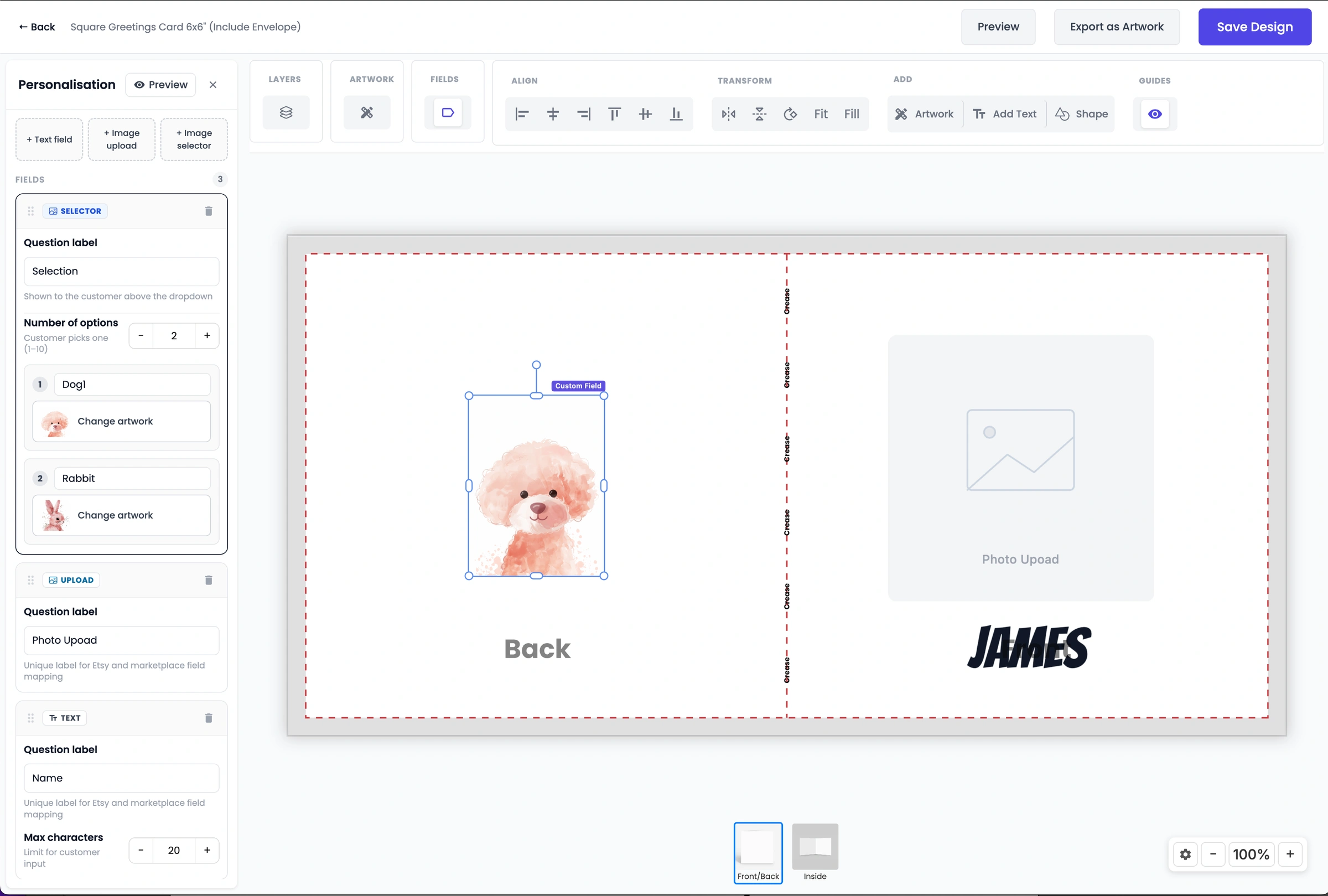
We cover more on custom fields in the Design Studio in this How to automate personalsied orders article.
(please note: we've cut some of the waiting time between messages in this video)
What happens next?
In the Papello seller dashboard you will see your eBay order has been processed. If you've set your eBay store to "manually approve personalised orders" then you will receive an email to release the order into production. Head to the dashboard to view the rendered artwork from the eBay buyer personalation messages, and Approve & Release order. Your order will now move into production to be printed and shipped.
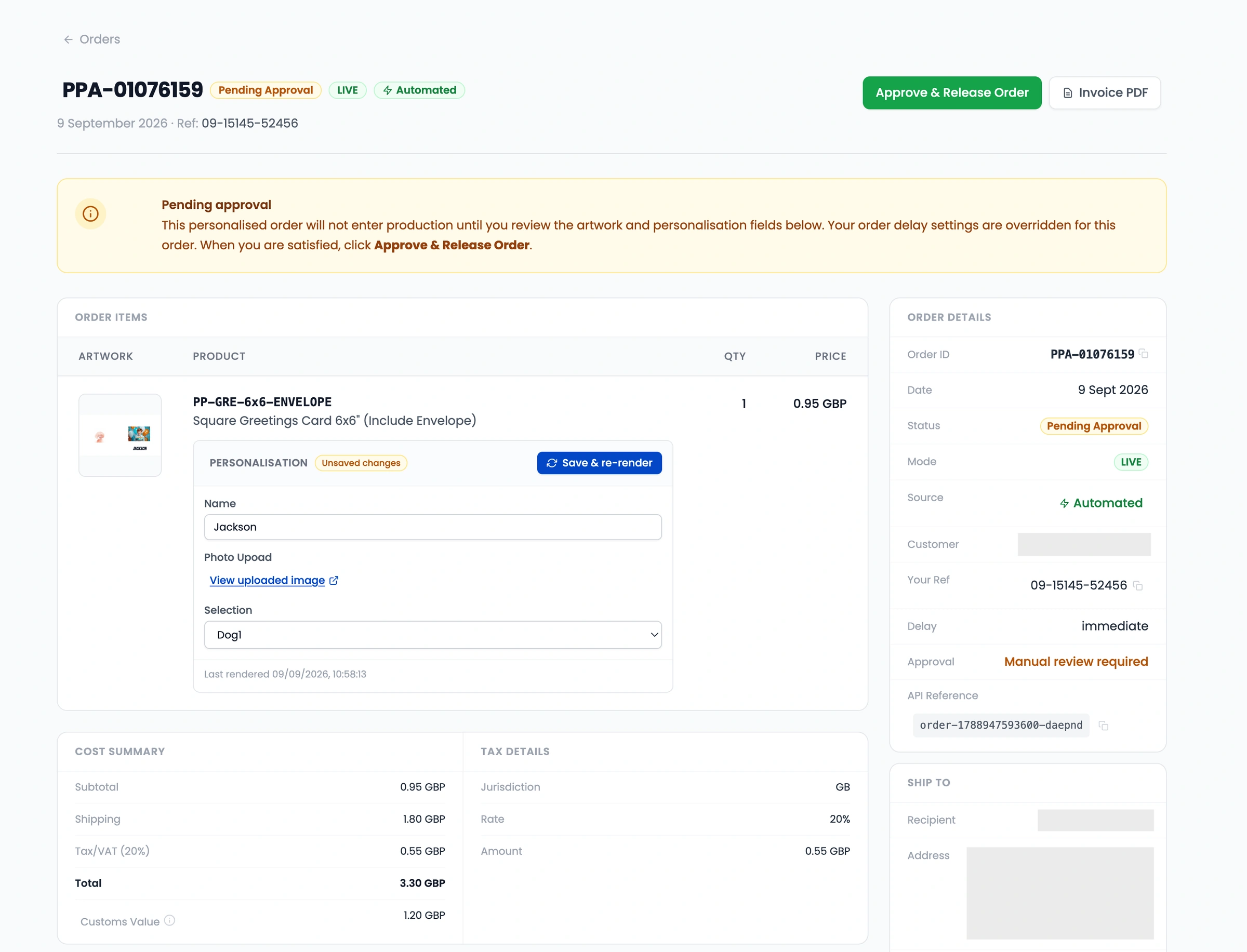
Flexible Control: Auto-Fulfil or Manual Review
You have complete control over how your eBay store operates. You can configure your account settings to:
Auto-Fulfil: Allow approved buyer proofs to route straight into production for 100% hands-off fulfilment.
Manual Review: Hold generated print files for a quick final review in your Papello dashboard before approving them for production.
Tap Into a Massive Market Opportunity
Personalised products command higher price points, better profit margins, and lower return rates. By removing the manual admin work and staying fully compliant with eBay policies, Papello merchants can now capture a huge portion of eBay's 136 million annual buyers without adding extra workload.
Whether you sell custom framed fine art, personalised greeting cards, custom photo prints, or bespoke gifts, you can publish personalised listings directly from Papello to eBay today.
How to Get Started
Connect your eBay account under Stores > "Connect eBay" in your Papello dashboard.
Create or select a personalised template in Design Studio.
Map your personalisation questions (text fields, photo uploads, image choices).
Publish your listing directly to eBay.
Log in to your Papello dashboard today to set up your eBay integration and start automating your