
If you already have established product listings on your Wix store, you do not need to recreate them from scratch to use Papello. You can easily map your existing Wix products and variants directly to Papello print templates.
Once mapped, any incoming order for that Wix product will automatically flow into Papello, triggering zero-touch production, packing, and dispatch.
Prerequisites
Before starting, ensure that:
Your Wix store is successfully connected to your Papello dashboard.
You have uploaded your high-resolution print artwork to your Papello Artwork Library.
Step-by-Step Automation Guide
1. Navigate to Store Products in Papello
Log in to your Papello seller dashboard.
Go to Stores from the main navigation menu.
Locate your connected Wix store and click Automate Store.
2. Select the Wix Product to Automate
Browse your list of synced Wix products.
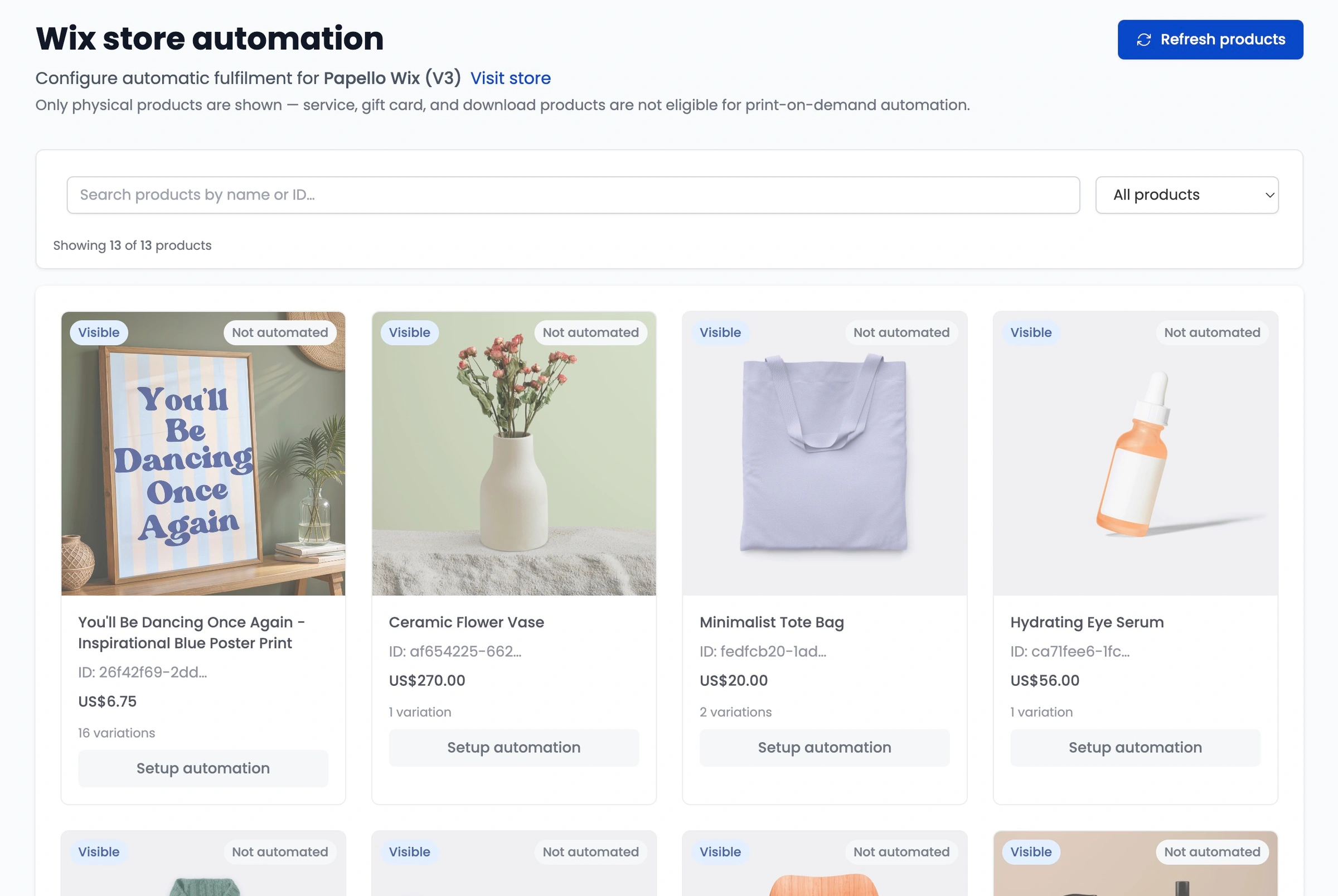
Find the product you want to link to Papello for fulfilment and click Setup Automation.
3. Map Variants to Papello Production Templates
If your Wix product has multiple options (such as sizes, frames, or paper types), you must map each individual variant to its corresponding Papello product:
Locate the specific Wix variant (e.g. A3 / Black Frame).
Click Select Product.
Use the popup modal to search and select the matching Papello product template from our catalogue.
4. Assign the Artwork File
Next to the mapped product, click Select Artwork.
Choose the matching high-resolution design file from your Artwork Library.
Our integrated Artwork Checker will verify that the image resolution and aspect ratio fit the selected print dimensions correctly. Adjust the positioning if required.
5. Repeat for All Variants
Repeat steps 3 and 4 for every variant listed under that Wix product to ensure complete coverage.
6. Save and Enable Automation
Once all variants have a Papello product and artwork file assigned to them:
Review your mappings to ensure product sizes and artwork match accurately.
Click the Enable Automation .
Click Save Automation Configuration.
How Automated Fulfilment Works Going Forward
Once your Wix product mapping is saved, the entire fulfilment loop runs automatically whenever a customer buys that item on your site:
Order Capture: A customer purchases the item on your Wix store.
Instant Sync: The order lands directly in your Papello dashboard.
Automated Production: Papello identifies the mapped product and assigned artwork, automatically creating the print job.
Hands-Off Dispatch: Our team prints, quality-checks, and white-label packages your item.
Tracking Update: Once shipped, Papello automatically updates the order status in Wix to fulfilled and attaches the tracking details, sending the dispatch confirmation email directly to your customer.